Which Receipt Printer for Which Counter: 2026 Shortlist
Most receipt printer problems we see are not faulty printers. They are the wrong receipt printer for the counter: a USB-only model bought for an iPad till, a thermal printer mounted above a grill, or a premium checkout printer in a shop that prints forty receipts a day. This shortlist matches nine real models to nine real jobs, so you can pick by situation instead of by spec sheet.
Which receipt printer should you order for your counter?
Find the row that describes your counter. The part number is the exact version we would ship for that job.
| Your situation | Order this | Why | Price tier |
|---|---|---|---|
| One till, PC-based POS, tight budget | Epson TM-T20IV (C31CL47101) | 203 dpi, 250 mm/s, USB and serial, 58 mm spacer in the box | Entry |
| Same, but the absolute lowest cost | Bixolon SRP-330III (SRP-330IIISK/BEG) | 180 dpi, 250 mm/s, USB and serial, 58 mm partition included | Entry |
| Café or shop running a tablet POS (iPad or Android) | Epson TM-m30III (C31CK50112) | Ethernet plus USB-C that charges and connects the tablet, spill-resistant top | Mid |
| Small counter, every centimetre counts | Bixolon SRP-Q300II (SRP-Q300IIK/BEG) | Cube shape, USB and Ethernet, USB-C tablet charging up to 18 W | Mid |
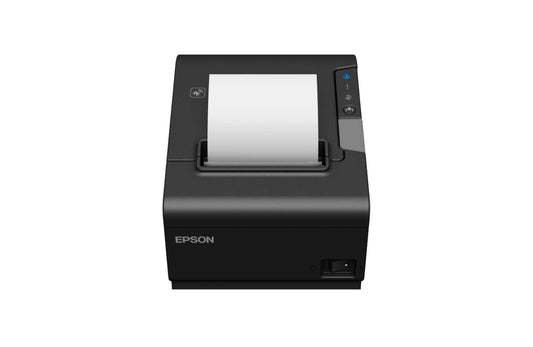
| Busy checkout, queues, supermarket | Epson TM-T88VII (C31CJ57112) | 500 mm/s, 3 million cut cutter, USB, serial and Ethernet | Premium |
| Hot kitchen next to the grill or fryer | Epson TM-U220IIB (C31CL27142) | Impact printing on plain paper, red and black, Ethernet, auto-cutter | Mid |
| Bar or kitchen pass with Wi-Fi only | Bixolon SRP-350plusV (SRP-350PLUSVWDAK/BEG) | 400 mm/s, USB, Ethernet and dual-band Wi-Fi | Mid |
| Pharmacy, clinic or any counter wiped with disinfectant | Citizen CT-E301 (CTE301XXEWX) | Antibacterial, disinfectant-resistant housing, 125 x 165 mm footprint | Entry |
| Table-side payment, market stall, delivery driver | Zebra ZQ210 (ZQ21-A0E01KE-00) | 265 g, 2 inch, Bluetooth and NFC pairing, charges over USB-C | Mid |
Not sure which row is yours? The rest of this guide explains the three decisions that matter: how the printer connects, what it prints on, and how hard it will be worked.
How does the receipt printer connect to your POS?
This is the decision that causes most returns. Match the interface to the device that sends the print job, not to what looks modern.
| Your POS runs on | Interface you need | Models from the shortlist |
|---|---|---|
| Windows PC at one till | USB (serial if the software is old) | TM-T20IV C31CL47101, SRP-330III SRP-330IIISK/BEG, CT-E301 |
| iPad or Android tablet | Ethernet or Wi-Fi, sometimes Bluetooth | TM-m30III C31CK50112 (Ethernet), TM-m30III C31CK50151 (Wi-Fi and Bluetooth), SRP-Q300II |
| Several tills or tablets sharing one printer | Ethernet | TM-T88VII C31CJ57112, TM-U220IIB C31CL27142 |
| Phone or handheld on the move | Bluetooth | Zebra ZQ210 |
Two rules from the service desk. First, most tablet POS apps cannot print to a USB-B printer, so a USB-only printer next to an iPad is a mistake that only shows up on opening day. Second, Bluetooth is a one-to-one link. It is fine for a single tablet, but as soon as two waiters or two tablets need the same printer, use Ethernet or Wi-Fi. Wired Ethernet is still the most reliable option for a kitchen printer, because a printer that drops off Wi-Fi during service loses orders without telling anyone.
Before you order, check the supported-hardware list of your POS app. Tablet apps usually talk to network printers, which is another reason to choose the Ethernet or Wi-Fi version.
Thermal or impact: which kitchen printer survives heat and grease?
A thermal receipt printer prints by heating special paper. That is fast, quiet and cheap to run, but thermal paper darkens when it is held next to a hot grill, a fryer or a salamander, and the ticket becomes unreadable. An impact printer such as the Epson TM-U220 series prints with a ribbon on plain paper, so heat does not touch the print.
| Thermal (TM-T20IV, TM-m30III, TM-T88VII) | Impact (TM-U220IIB) | |
|---|---|---|
| Speed | 250 to 500 mm/s | Up to 8.8 lines per second |
| Paper | Thermal paper, 80 or 58 mm | Plain paper, 76 mm, also 2-ply carbonless |
| Consumables | Paper only | Paper plus ribbon cassette (ERC-38 type) |
| Two colours | No (black only on standard paper) | Yes, black and red to flag allergies or modifiers |
| Noise | Quiet | Audible, which kitchens often like |
| Best place | Front counter, bar, cool kitchen pass | Hot line, grill, pizza oven |
The honest trade-off: if your kitchen printer sits on a shelf at the pass, away from direct heat, a thermal printer is fine and cheaper to feed. Only pay for impact where the ticket actually lives near heat. One detail people miss: the TM-U220IIB C31CL27142 ships with the AC adapter, a black and red ribbon and a starter roll, but the power cord and interface cable are ordered separately. Add them to the same order.
How many receipts a day: when does the premium printer pay off?
Entry printers are not fragile. The Epson TM-T20IV is rated for 60 million lines MCBF and a 2 million cut auto-cutter, which is far more than a café or boutique will ever print. The Epson TM-T88VII moves to 500 mm/s, a 3 million cut cutter, 70 million lines MCBF and a 200 km thermal head life. That difference matters when:
- a queue forms and every second per receipt shows up as waiting customers,
- receipts are long (loyalty info, coupons, deposit lines),
- the printer runs two shifts a day, every day, for five years or more,
- you are replacing a TM-T88V or TM-T88VI, because the TM-T88VII is software-compatible with both and drops into the existing installation.
For a single till with a few hundred receipts a day, the TM-T20IV or the Bixolon SRP-330III is the sensible buy. Spending the difference on a spare printer often gives you more uptime than buying the premium model.
Which tablet POS printer: TM-m30III or SRP-Q300II?
Both are compact 80 mm printers designed for tablet counters. Both print at 203 dpi and both can charge a tablet over USB-C at up to 18 W, which removes one power adapter from the counter.
- Epson TM-m30III: 300 mm/s, two USB-A ports for a scanner or customer display, an IPX2 spill-resistant antibacterial housing and network tethering through USB-C. The C31CK50112 is the Standard model in black with Ethernet. If you cannot run a cable, the C31CK50151 adds Wi-Fi and Bluetooth (white).
- Bixolon SRP-Q300II: 250 mm/s, cube footprint, USB and Ethernet plus three USB host ports. Note that the USB cable is not in the box.
Our default for a café counter with drinks nearby is the TM-m30III because of the spill-resistant top. Where space is the constraint and spills are not, the SRP-Q300II is a good, slightly cheaper choice.
What goes wrong after the receipt printer is installed?
- Wrong paper width. Most 80 mm printers take 58 mm paper with a spacer, but the POS software must be set to 58 mm too, or receipts print cut off.
- Roll too large. The TM-T20IV accepts rolls up to 83 mm diameter. Bulk rolls from a cash-and-carry may not close the cover.
- Missing local characters. If õ, š, ł or ř print as question marks, the printer code page does not match the software. This is a setting, not a fault.
- Cash drawer does not open. The drawer connects to the printer's drawer kick-out port with an RJ12 cable, not to the PC. Check that the drawer is compatible with 24 V printer kick-out.
- Kitchen printer on guest Wi-Fi. Put printers on a fixed IP address on the staff network, or orders will vanish when the router reassigns addresses.
Common questions
Should I choose 80 mm or 58 mm paper?
80 mm for any fixed counter. It fits more text per line and is the standard width for receipt rolls. 58 mm makes sense only for mobile printers or where the software forces it.
Is a standard receipt printer a fiscal printer?
No. The printers in this guide are non-fiscal. In markets that require a certified fiscal device, such as Poland, they are used for kitchen orders, order tickets and non-fiscal printouts next to the fiscal device. Check your local tax rules before replacing a fiscal device.
Can a thermal printer work in a kitchen?
Yes, if it sits away from direct heat. Near grills, fryers and ovens choose an impact printer such as the TM-U220IIB, because thermal paper darkens with heat.
Do I need Ethernet if my POS is on a PC?
Not for a single till. USB is simpler. Choose Ethernet when more than one device prints to the same printer, or when the printer is more than a cable length from the PC.
Which receipt printer works with an iPad?
A network model such as the Epson TM-m30III with Ethernet, or its Wi-Fi and Bluetooth version. Avoid USB-only models for iPad counters.
Is BPA-free thermal paper needed?
BPA in thermal paper is restricted in the EU, so rolls sold here should already be BPA-free. Many buyers now also ask for phenol-free paper, which the TM-T88VII supports.
Where to go from here
Compare all models in POS receipt printers, including Ethernet and Wi-Fi versions of the models above, and order rolls in the right width and diameter from thermal paper rolls. For the exact Epson specifications, see the Epson TM-T20IV product page.
Tags:
Previous
Zebra DS2278 vs DS8178 vs Honeywell 1962g: Cordless Scanners
Next
Label Material Guide: Paper, PP, PE or Polyester Labels