Comparison
Honeywell Xenon Ultra 1960g vs Xenon 1950g: what changed
The Xenon Ultra 1960g adds a bigger sensor, a green aiming dot and longer reading ranges; the 1950g keeps RS485 for IBM tills.
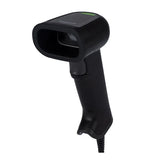
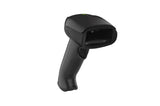
In this guide
Honeywell presents the Xenon Ultra 1960g as a premium evolution of its legacy Xenon and Xenon XP scanners. Compared with the Xenon XP 1950g, it has a taller image sensor, a green aiming dot and clearly longer reading ranges in the data sheets. The 1950g keeps an RS485 interface for IBM point-of-sale terminals, which the 1960g data sheet does not list. For a new installation on USB, the 1960g is the stronger scanner; the 1950g remains a proven choice where it already runs.
| Xenon Ultra 1960g | Xenon XP 1950g | |
|---|---|---|
| Image sensor | 1280 × 1080 pixels | 1280 × 800 pixels |
| Field of view (horizontal × vertical) | 42° × 36° | 42° × 27° |
| Motion tolerance, 13 mil UPC | Up to 4 m/s (SR focus) | Up to 4 m/s (400 cm/s) |
| Pitch / skew tolerance | ±65° / ±65° | ±45° / ±65° |
| Aimer | Green dot (525 nm LED) | Bar-type aimer (product page; not in the data sheet) |
| Reading range, 13 mil UPC/EAN, SR focus | 0–654 mm | 0–490 mm |
| Reading range, 13 mil UPC/EAN, HD focus | 0–502 mm | 0–368 mm |
| Reading range, 10 mil QR code, SR focus | 11–262 mm | 35–250 mm |
| Reading range, 5 mil Code 39, SR focus | 23–311 mm | 28–242 mm |
| Host interfaces | USB, keyboard wedge, RS-232 | USB, keyboard wedge, RS-232, RS485 for IBM 46XX |
| Print contrast | From 15% | From 15% |
| Size (L × W × H) | 108.2 × 70.4 × 160.2 mm | 104.1 × 71.1 × 160 mm |
| Weight | 147.2 g | 147.42 g |
| Drops / tumbles / sealing | 50 × 1.8 m / 2,000 × 0.5 m / IP52 | 50 × 1.8 m / 2,000 × 0.5 m / IP52 |
| Operating temperature | 0 to 50 °C | 0 to 50 °C |
| Warranty | 5 years | 5 years |
| Our version | 1960GSR-2-2: SR focus, scanner only | 1950GHD-2USB-R: HD focus, kit with 3 m USB cable |
Specifications from Honeywell's Xenon Ultra 1960g data sheet (Rev C, 04/26) and Xenon XP 1950g data sheet (Rev I, 01/23); the 1960g drop count is from Honeywell's 1960 product page. Reading ranges are typical values; Honeywell notes that they vary with barcode quality and surroundings.
Choose the 1960g if
- you scan large 2D codes, shipping labels or codes from a distance: the taller sensor and longer ranges help
- you prefer a green aiming dot for targeting
- you want the newest platform, with the cordless 1962g sharing the same settings and User Guide
- you are replacing 1950g scanners and want to keep the cables
Choose the 1950g if
- you connect to an IBM point-of-sale terminal over RS485
- you need a ready USB kit with cable in one item
- your other tills already run 1950g scanners with the same settings
- you work with very small codes at close range: our HD version is focused for those
What the Xenon Ultra adds
- Bigger image. The 1280 × 1080 sensor captures a taller field of view (36° instead of 27° vertically), so a tall 2D code or label fits more easily in one read.
- Green aiming dot and warm white light. Honeywell specifies a 525 nm green dot aimer and 2700 K white illumination for the 1960g.
- Object detection. In a stand, the 1960g can wake up when an item comes close; Honeywell configures this at about 76 mm (3 in) by default, 152 mm (6 in) as an option.
- Tougher on drops. Besides the 50 drops from 1.8 m, the 1960g data sheet adds a 3 m military-standard drop rating.
What stays the same
Both scanners read the same families of codes: 1D, PDF417, 2D, postal codes, Digimarc, DotCode and OCR, depending on configuration. Both work as a USB keyboard out of the box, and the programming barcodes have the same names, including the keyboard countries for our markets and the Enter and Tab suffix codes. Both support Honeywell's Scanner Management Utility for managing many scanners.
Honeywell states that cables from existing Xenon XP 1950g installations work with the 1960g. That matters because our 1960GSR-2-2 comes without a cable. The older Xenon XP 1950 flexible stand also works, after a configuration change described in Honeywell's Xenon Ultra accessory guide.
Setting up either scanner: see our Xenon Ultra setup guide or Xenon 1950g setup guide. Product pages: Xenon Ultra 1960g and Xenon 1950g. More guides: 1960g · 1950g.
Frequently asked questions
Is the Xenon Ultra 1960g the successor to the Xenon 1950g?
In practice, yes. Honeywell describes the Xenon Ultra as a premium evolution of the legacy Xenon and Xenon XP general-purpose scanners, and cables from Xenon XP 1950g installations work with the 1960g.
Can I use my Xenon 1950g cable with the Xenon Ultra 1960g?
Yes. Honeywell states that cables from existing Xenon XP 1950g installations work with the 1960g.
Does the Xenon Ultra 1960g support RS485 for IBM terminals?
The 1960g data sheet lists USB, keyboard wedge and RS-232 only. For RS485 to IBM 46XX terminals, the 1950g data sheet lists support.
What is the difference between SR and HD?
SR (standard range) reads further and suits most barcodes. HD (high density) is focused closer and reads very small, fine codes, at a shorter maximum distance.
Was this guide helpful?
More XENON1950G guides
XENON1950G
TroubleshootingHoneywell Xenon 1950g and 1952g troubleshooting: beeps and LEDs10 min · Easy
XENON1950G
How-toHoneywell Xenon: keyboard country, Enter and Tab suffix5 min · Easy
V1470G
ComparisonHoneywell Xenon 1950g vs Voyager 1470g: which corded 2D scanner?5 min · Easy
XENON1950G
SetupHoneywell Xenon 1950g and 1952g setup: USB, base and charging15 min · Easy
Still stuck?
Contact support
Send us your model and a short description of the problem. Our team will help you find a solution.